

Internal Rate of Return (IRR) Calculator


Use this IRR calculator to estimate the annualized return on an investment based on when you invested and when you received money back.
Enter your initial investment and withdrawal, including the date of each cash flow. You can add more investments or withdrawals if needed.
IRR Calculator

Insert the date and amount of each cash flow associated with your investment


How to Use the IRR Calculator
- Enter the date and amount of your initial investment.
- Enter the date and amount of your withdrawal or investment proceeds.
- Add any additional investments or withdrawals.
- Select “Calculate.”
You need at least one investment and one withdrawal to calculate an IRR.
Investments and Withdrawals
An investment is money you put in. This is treated as a negative cash flow.
A withdrawal is money you receive from the investment. This is treated as a positive cash flow.
Withdrawals can include:
- Investment income
- Dividends or distributions
- Rental income
- Proceeds from selling the investment
- The investment’s remaining value at the end of the calculation period
For example, suppose you invest $10,000 and later sell the investment for $12,000. The $10,000 is an investment, while the $12,000 is a withdrawal.
In the IRR calculator above, enter both amounts as positive numbers. When you select Invest or Withdraw, the calculator will automatically treat investments as negative cash flows and withdrawals as positive cash flows.
What Is IRR?
The internal rate of return, or IRR, estimates the annualized return generated by an investment based on its cash flows.
It considers:
- How much money you invested
- How much money you received
- When each cash flow occurred
For example, investing $1,000 and receiving $1,100 exactly one year later would produce an IRR of 10%.
A higher IRR indicates a higher return. However, keep in mind that IRR should not be used on its own when deciding whether an investment is suitable.
IRR and Net Present Value (NPV)
Net present value, or NPV, measures the present value of an investment’s future cash flows after accounting for a chosen discount rate.
The basic NPV formula is:
NPV = CF0 + CF1 ÷ (1 + r) + CF2 ÷ (1 + r)2 + … + CFn ÷ (1 + r)n
Where:
- CF is a cash flow
- r is the discount rate
- n is the number of time periods
Internal rate of return (IRR) is defined as the discount rate, which equates net present value (NPV) to zero, and money-weighted rate of return (MWRR) is the discount rate which sets the present value of cash outflows equal to the present value of the cash inflows. The numeric value of IRR equals the numeric value of MWRR.
IRR accounts for the time value of money. This is important because receiving $1,000 today is more valuable than receiving $1,000 several years from now.
IRR vs. XIRR
IRR and XIRR (Extended Internal Rate of Return) both estimate an investment’s rate of return, but they handle timing differently.
| Calculation | When It Is Used |
|---|---|
| IRR | Cash flows occur at regular intervals, such as every month or every year |
| XIRR | Cash flows occur on specific or irregular dates |
This calculator uses the actual dates entered for each cash flow. This makes it suitable when investments and withdrawals do not occur at perfectly regular intervals.
The result is shown as an annualized rate of return.
How to Interpret IRR
IRR can help you compare an investment’s estimated return with another investment or with a required rate of return, such as comparing it to a borrowing cost, savings account rate, GIC rate or bond yield.
For example:
- An IRR of 8% means the cash flows produced an estimated annualized return of 8%.
- A negative IRR means you received less value than you invested.
- An IRR above your required return may make an investment more attractive.
- An IRR below your required return may make an investment less attractive.
- If the IRR equals your required return, the investment’s NPV is approximately zero.
Since IRR is a percentage return, it does not show your total dollar profit.
IRR Example
Suppose you make the following investment:
| Date | Cash Flow | Amount |
|---|---|---|
| January 1, 2025 | Investment | $1,000 |
| January 1, 2026 | Withdrawal | $1,100 |
The investment earned $100 over one year, producing an IRR of 10%.
If you received the same $1,100 in less than one year, the annualized IRR would be higher. If it took more than one year, the annualized IRR would be lower.
This is why the timing of each cash flow matters.
How Is IRR Calculated?
IRR is the discount rate that makes the net present value of all an investment’s cash flows equal to zero.
In simpler terms, it finds the annualized rate of return that connects the money invested with the money later received, while accounting for when each transaction occurred.
Financial calculators and spreadsheet programs, like Excel, generally calculate IRR by testing possible rates until they find a result that balances the cash flows.
How to Calculate IRR in Excel or Google Sheets
Use the IRR function when cash flows occur at regular intervals:
=IRR(values)
Use the XIRR function when you have the actual date of each cash flow:
=XIRR(values, dates)
For example, if the cash-flow amounts are in cells B2 to B5 and their dates are in cells A2 to A5, use:
=XIRR(B2:B5, A2:A5)
Enter investments as negative values and money received as positive values when using a spreadsheet directly.
Annuity Example
Alex purchased an annuity, which cost him $1000. In exchange, he will receive 12 payments of $100 each. The first payment will be one month after the purchase, and each succeeding month for 12 months. To calculate the IRR, we insert all cash flows in an Excel spreadsheet, as shown below.


As we see, IRR is calculated as 3%. It is important to note that, as cash flows are one month apart, the calculated IRR is a monthly rate. In cell B16, the equivalent annual rate is 41.3%. In cell B17, NPV is calculated using the calculated IRR as the discount rate. The result of 0 confirms that IRR is calculated correctly.
Real Estate Example
Fred bought a mirror image duplex in August 2022 for $270k with a 20% down payment and 4.1% interest. He spends $5,000 on closing costs. He pays $1,500 monthly for the mortgage, property tax and insurance. Fred rents unit 2 to tenants and receives $900 monthly while spending $8,000 each month improving unit 1. He is counting on $5,000 a month as his wage for making the improvements.
After five months, tenants leave Unit 2, and Fred lists Unit 1 for sale. At this time, Fred starts working on improving Unit 2, spending $8,000 each month as well. 7 Months after his purchase, he sells unit 1 for $230k and pays back his mortgage. He incurs a 5% closing cost, including his mortgage prepayment penalty. 10 months after his purchase, he completed improvements to unit 2 and listed it for sale. It sells for $230k one year after his initial investment, with 5% closing costs.
What is the IRR in this project?
We enter all the cash flows into the freely available online version of Excel. Column A contains the description of each cash flow, while column B contains the date of each cash flow. Finally, column C has the signed amount of each cash flow. The data and calculations are presented in the figure below.

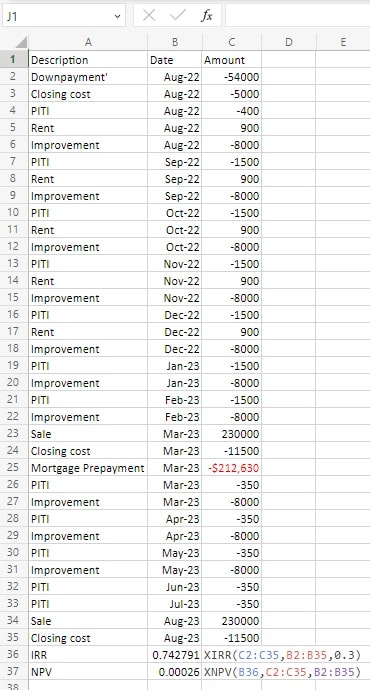
In cell B36, we enter the formula “=XIRR(C2:C35,B2:B35,0.3)”. XIRR is the most general Excel formula for calculating the IRR. In this formula, the first argument (C2:C35) is the range of cells containing cash flows, and the second argument (B2:B35) is the range of cells containing dates where each cash flow occurs. The third (last) argument is optional. It contains your guess of what IRR might be. In this example, Excel has calculated the IRR to be 74%.
Unfortunately, there is no formula for calculating IRR. Excel uses a numeric method, which involves testing many potential values for IRR. As a result, it is best to check your calculations’ results and ensure they are correct.
Checking the Calculated IRR
When the correct value of IRR is used as the discount rate, NPV is zero. We enter the formula =XNPV(B36,C2:C35,B2:B35) to check the calculated IRR. XNPV is the most general Excel formula for calculating net present value. In this formula, the first argument (B36) is the discount rate, the second argument (C2:C35) is the list of cash flows, and the third argument (B2:B35) is the list of dates when each cash flow has occurred. In this example, we see that using the calculated IRR, the NPV is almost zero. Thus, our calculated IRR is correct.
Limitations of IRR
IRR can be useful for comparing investments, but it does not provide a complete picture.
Consider the following limitations:
- IRR does not show the total dollar profit.
- An investment with a high IRR may still produce a small profit if little money was invested.
- IRR does not directly account for differences in investment risk.
- Fees and taxes must be entered as cash flows if you want them reflected in the result.
- Unusual cash-flow patterns may produce more than one possible IRR or no usable result.
Consider IRR together with measures such as total return, net present value, investment risk and the amount of money earned.
Disclaimer:
- Any analysis or commentary reflects the opinions of WOWA.ca analysts and should not be considered financial advice. Please consult a licensed professional before making any decisions.
- The calculators and content on this page are for general information only. WOWA® does not guarantee the accuracy and is not responsible for any consequences of using the calculator.
- Financial institutions and brokerages may compensate us for connecting customers to them through payments for advertisements, clicks, and leads.
- Interest rates are sourced from financial institutions' websites or provided to us directly. Real estate data is sourced from the Canadian Real Estate Association (CREA) and regional boards' websites and documents.